

Wer von Mastodon kommt, kennt die einfache Möglichkeit Hashtags zu folgen um seine Timeline dank fehlender Algorithmen interessant zu füllen. Bei Hubzilla geht das auch, über einen kleinen Umweg mit noch viel besseren Einstellmöglichkeiten.
Zuerst definiert man einen Link dem man den gewünschten Tag anhängt auf https://relay.fedi.buzz/tag/
Sieht dann so aus, für beispielsweise dem Hashtag "hubzilla:
Dann geht man auf seiner Instanz auf "Verbindungen"
Translated with DeepL.com (free version)

Dort gibt man die eben erstellte Channeladresse ein und klickt auf das Plus woraufhin sich ein neues Fenster öffnet:

Interessant ist hierbei das Feld "Filter für den Inhalt" - "Nur Beiträge mit diesem Text importieren" und "Beiträge mit diesem Text nicht importieren"

Mit "lang=de" werden nur deutsche hubzilla-Beiträge angezeigt. Man kann zwar an anderer Stelle in der Administration auch einstellen das nur deutsche Beiträge angezeigt werden sollen, aber vielleicht will man woanders ja auch englische haben. Hier gilt das nur für den definierten Hashtag.
Beim Feld darunter könnte man mit "lang=cn" alle Sprachen abrufen außer chinesisch. Hier findet man weitere Ländercodes: Ländercodes nach ISO-3166
Mit ein bischen rumprobiererei kann man sich seinen Feed perfekt anpassen. Die Felder Rollen und Privacygruppen kann man hier vernachlässigen weil der Hashtag keine Userrechte braucht, er agiert ja nicht.
#Hubzilla #Mastodon #Hashtags
Zuerst definiert man einen Link dem man den gewünschten Tag anhängt auf https://relay.fedi.buzz/tag/
Sieht dann so aus, für beispielsweise dem Hashtag "hubzilla:
https://relay.fedi.buzz/tag/hubzillaDann geht man auf seiner Instanz auf "Verbindungen"
Translated with DeepL.com (free version)
Anyone who comes from Mastodon knows how easy it is to follow hashtags to fill their timeline with interesting content thanks to the lack of algorithms. This is also possible with Hubzilla, via a small detour with even better settings options.
First, define a link to which you attach the desired tag on https://relay.fedi.buzz/tag/
It will then look like this, for example, for the hashtag "hubzilla:https://relay.fedi.buzz/tag/hubzilla
Then go to “Connections” on your instance.
Dort gibt man die eben erstellte Channeladresse ein und klickt auf das Plus woraufhin sich ein neues Fenster öffnet:
Enter the channel address you just created and click on the plus sign, which will open a new window:
Interessant ist hierbei das Feld "Filter für den Inhalt" - "Nur Beiträge mit diesem Text importieren" und "Beiträge mit diesem Text nicht importieren"
The “Filter for content” field is interesting here - “Only import posts with this text” and “Do not import posts with this text.”
Mit "lang=de" werden nur deutsche hubzilla-Beiträge angezeigt. Man kann zwar an anderer Stelle in der Administration auch einstellen das nur deutsche Beiträge angezeigt werden sollen, aber vielleicht will man woanders ja auch englische haben. Hier gilt das nur für den definierten Hashtag.
Beim Feld darunter könnte man mit "lang=cn" alle Sprachen abrufen außer chinesisch. Hier findet man weitere Ländercodes: Ländercodes nach ISO-3166
Mit ein bischen rumprobiererei kann man sich seinen Feed perfekt anpassen. Die Felder Rollen und Privacygruppen kann man hier vernachlässigen weil der Hashtag keine Userrechte braucht, er agiert ja nicht.
With “lang=de,” only German Hubzilla posts are displayed. You can also set other areas of the administration to display only German posts, but you may want to have English posts elsewhere. Here, this only applies to the defined hashtag.
In the field below, you could use “lang=cn” to display all languages except Chinese. You can find more country codes here: Country codes according to ISO-3166
With a little trial and error, you can customize your feed perfectly. The fields “Roles” and “Privacy groups” can be ignored here because the hashtag does not require user rights; it does not take action.
#Hubzilla #Mastodon #Hashtags
Ich hatte letztens endlich die Lösung gefunden, wie ich auf meinem GrapheneOS-Handy ohne die Google Play-Services Benachrichtigungen meiner Nextcloud empfangen kann. Speziell ging es mir um Benachrichtigungen der Nextcloud-Talk-App.
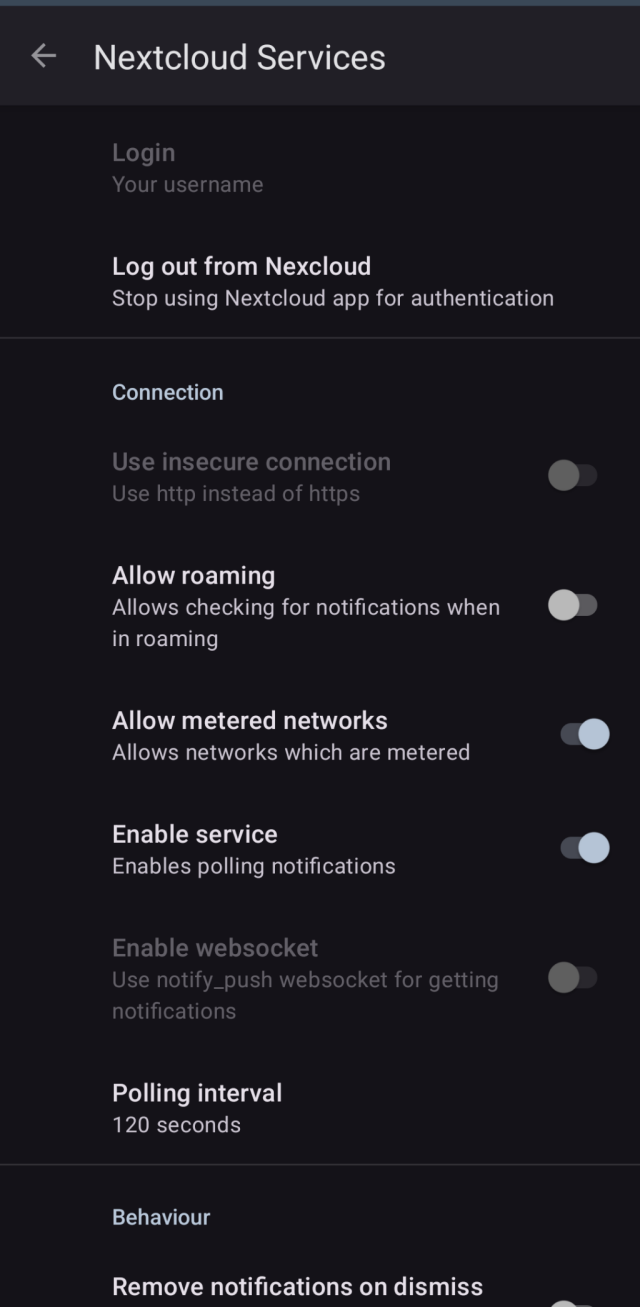
Ich hatte es erst die ganze Zeit mit der Nextcloud-App "UnifiedPush Provider" versucht, was aber gar nicht funktionierte, ich meine man benötigt da eine Redis-Datenbank auf seinem Server, was ich nicht habe. Naja ich hab dann die App "NextcloudServices" im F-Droid Store gefunden, da gibt man einfach seinen NC-Login ein, konfiguriert den Polling-Intervall und fertig. Kein Redis, kein Fire Cloud Messaging, kein Google Cloud Messaging, ganz easy ohne Datenschnüffelei und Datenbank-Gefummel.
Mein eingestellter Polling-Intervall liegt bei 2 Minuten, die Akkunutzung ist vernachlässigbar gering auch bei eingestellter Hintergrundnutzung/ausgeschaltete Akkuoptimierung.
Translated with DeepL.com (free version)
NextcloudServices | F-Droid - Free and Open Source Android App Repository
#Nextcloud #Android #GrapheneOS
Ich hatte es erst die ganze Zeit mit der Nextcloud-App "UnifiedPush Provider" versucht, was aber gar nicht funktionierte, ich meine man benötigt da eine Redis-Datenbank auf seinem Server, was ich nicht habe. Naja ich hab dann die App "NextcloudServices" im F-Droid Store gefunden, da gibt man einfach seinen NC-Login ein, konfiguriert den Polling-Intervall und fertig. Kein Redis, kein Fire Cloud Messaging, kein Google Cloud Messaging, ganz easy ohne Datenschnüffelei und Datenbank-Gefummel.
Mein eingestellter Polling-Intervall liegt bei 2 Minuten, die Akkunutzung ist vernachlässigbar gering auch bei eingestellter Hintergrundnutzung/ausgeschaltete Akkuoptimierung.
Translated with DeepL.com (free version)
I finally found a solution for receiving notifications from my Nextcloud on my GrapheneOS phone without Google Play Services. Specifically, I was interested in notifications from the Nextcloud Talk app.
At first, I tried the Nextcloud app “UnifiedPush Provider,” but it didn't work at all. I think you need a Redis database on your server, which I don't have. Well, I then found the app “NextcloudServices” in the F-Droid Store. You just enter your NC login, configure the polling interval, and you're done. No Redis, no Fire Cloud Messaging, no Google Cloud Messaging, very easy without data snooping and database fiddling.
My set polling interval is 2 minutes, and battery usage is negligible even with background usage enabled/battery optimization disabled.
NextcloudServices | F-Droid - Free and Open Source Android App Repository
Simply fetch Nextcloud notifications on devices without Google Play services
#Nextcloud #Android #GrapheneOS
Man kann sich in Hubzilla mit PHP jeden Wert aus der Datenbank holen, in einem Block ablegen und als Widget auf der Seite anzeigen lassen. Dazu muss die Hubzilla-App "Webseiten" installiert sein und die App "PDL Editor". Dann muss man auf seinem Kanal noch einstellen das Code zugelassen wird. Das aktiviert man unter Administration - Kanäle - Checkbox des Kanals anklicken - Code erlauben
Dann klickt man auf Webseiten - Blöcke - Erstellen - Art des Seiteninhalts - PHP
Als Blockname vergibt man einen Namen unter dem man den Block später im PDL Editor unter Items findet
Translated with DeepL.com (free version)
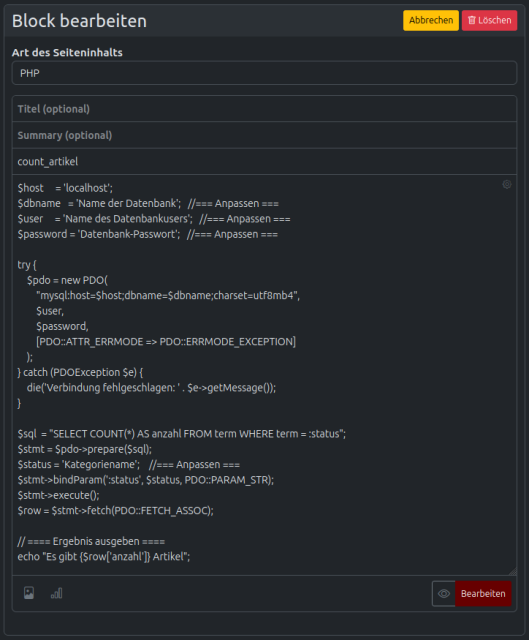
Hier der Code zum kopieren:
Anmerkung: Es müssen 4 Werte angepasst werden, wichtig ist der "Kategoriename", denn die Anzahl derer wird aus der Datenbank zusammengezählt. Ich habe gestern noch keine anderen Werte in der riesigen Tabelle "term" gefunden wo scheinbar wirklich alles drin abgelegt wird woraus sich z.B. die Kategorie Artikel raus ableiten ließe.
Deswegen ist es wichtig, seinen Artikeln zusätzlich einen einzigartigen Kategorienamen zu geben der garantiert nicht anderweitig benutzt wird. Das sollte aber auch mit allem funktionieren was sich unter Kategorien ablegen lässt, z.B. Karten oder normale Posts, weil wie gesagt alles in der Tabelle Term abgelegt wird. Meine "term" hat nach 1 Woche bereits über 37.000 Einträge.
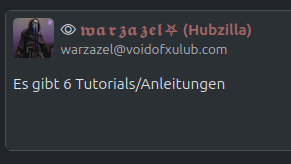
Ist das erledigt, geht man in den PDL Editor, wählt unter Modules die Seite aus, auf der der Block angezeigt werden soll, z.B. articles und unter items ist der Block dann zu finden:
Wichtig/Important
https://voidofxulub.com/item/053efe40-7d7b-4bd4-ace1-f165f8d9ee54
#Hubzilla #Datenbank #MySQL
Dann klickt man auf Webseiten - Blöcke - Erstellen - Art des Seiteninhalts - PHP
Als Blockname vergibt man einen Namen unter dem man den Block später im PDL Editor unter Items findet
Translated with DeepL.com (free version)
In Hubzilla, you can use PHP to retrieve any value from the database, store it in a block and display it as a widget on the page. To do this, you need to install the Hubzilla app "Websites" and the app "PDL Editor". Then you have to set your channel to allow code. This can be activated under Administration - Channels - Click the channel checkbox - Allow code
Then click on Websites - Blocks - Create - Type of page content - PHP
Assign a name to the block that you can later find in the PDL Editor under Items.
Hier der Code zum kopieren:
Here is the code to copy:
$host = 'localhost';
$dbname = 'Name der Datenbank'; //=== Anpassen ===
$user = 'Name des Datenbankusers'; //=== Anpassen ===
$password = 'Datenbank-Passwort'; //=== Anpassen ===

try {
$pdo = new PDO(
"mysql:host=$host;dbname=$dbname;charset=utf8mb4",
$user,
$password,
[PDO::ATTR_ERRMODE => PDO::ERRMODE_EXCEPTION]
);
} catch (PDOException $e) {
die('Verbindung fehlgeschlagen: ' . $e->getMessage());
}

$sql = "SELECT COUNT(*) AS anzahl FROM term WHERE term = :status";
$stmt = $pdo->prepare($sql);
$status = 'Kategoriename'; //=== Anpassen ===
$stmt->bindParam(':status', $status, PDO::PARAM_STR);
$stmt->execute();
$row = $stmt->fetch(PDO::FETCH_ASSOC);

// ==== Ergebnis ausgeben ====
echo "Es gibt {$row['anzahl']} Artikel";
Anmerkung: Es müssen 4 Werte angepasst werden, wichtig ist der "Kategoriename", denn die Anzahl derer wird aus der Datenbank zusammengezählt. Ich habe gestern noch keine anderen Werte in der riesigen Tabelle "term" gefunden wo scheinbar wirklich alles drin abgelegt wird woraus sich z.B. die Kategorie Artikel raus ableiten ließe.
Deswegen ist es wichtig, seinen Artikeln zusätzlich einen einzigartigen Kategorienamen zu geben der garantiert nicht anderweitig benutzt wird. Das sollte aber auch mit allem funktionieren was sich unter Kategorien ablegen lässt, z.B. Karten oder normale Posts, weil wie gesagt alles in der Tabelle Term abgelegt wird. Meine "term" hat nach 1 Woche bereits über 37.000 Einträge.
Ist das erledigt, geht man in den PDL Editor, wählt unter Modules die Seite aus, auf der der Block angezeigt werden soll, z.B. articles und unter items ist der Block dann zu finden:
Note: Four values need to be adjusted, the most important being the "category name", as the number of these is calculated from the database. Yesterday, I couldn't find any other values in the huge "term" table, which seems to contain everything, from which the category "articles" could be derived, for example.
That is why it is important to give your articles a unique category name that is guaranteed not to be used elsewhere. However, this should also work with everything that can be stored under categories, e.g. cards or normal posts, because, as I said, everything is stored in the Term table. After one week, my "term" already has over 37,000 entries.
Once this is done, go to the PDL Editor, select the page on which the block is to be displayed under Modules, e.g. articles, and the block can then be found under items:
Wichtig/Important
https://voidofxulub.com/item/053efe40-7d7b-4bd4-ace1-f165f8d9ee54
#Hubzilla #Datenbank #MySQL
Da Hubzilla ja alles, auch Bilder, Videos, Dokumente als Blob (Binary Large OBject) in der Datenbank ablegt schwillt die in kurzer Zeit ziemlich an. Meine z.B. hat nach 4 Tagen eine Größe von 1,2Gb. Ich hab 2 Wege gefunden das Problem zu lösen:
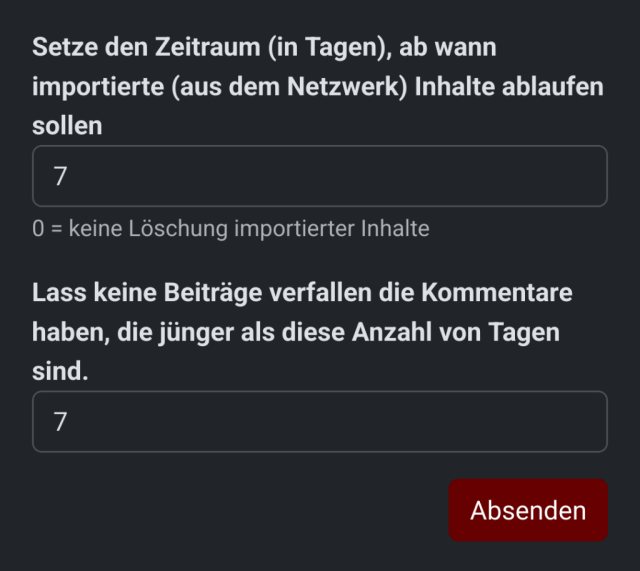
Administration - Seite - ganz nach unten scrollen:
Setze den Zeitraum (in Tagen), ab wann importierte (aus dem Netzwerk) Inhalte ablaufen sollen
und
Lass keine Beiträge verfallen die Kommentare haben, die jünger als diese Anzahl von Tagen sind
Dabei werden Instanzfremde Inhalte mit denen deine Instsnz nicht agiert hat nach X Tagen gelöscht. Ich habe beide Werte auf 7 Tage eingestellt.
Translated with DeepL.com (free version)
Außerdem kann man mit folgendem Befehl seine Datenbank optimieren:
Der Befehl ist ein praktisches Hilfsmittel, das alle Datenbanken deines MySQL‑Servers durchgeht und für jede Tabelle ein OPTIMIZE TABLE ausführt. Kurz gesagt:
Was passiert dabei?
Fragmentierte Daten‑ und Indexdateien werden neu angeordnet.
Nicht mehr genutzter Speicherplatz wird freigegeben.
Die Zugriffs‑Performance kann sich verbessern, weil die Daten jetzt kompakter liegen.
Warum ist das nützlich?
Wenn du häufig INSERT/UPDATE/DELETE‑Operationen hast, können Tabellen im Laufe der Zeit „ausgelutscht“ werden. Das Optimieren hilft, die Performance wieder zu stabilisieren. Es reduziert die Größe deiner Datenbank‑Dateien, was gerade bei begrenztem Speicher praktisch sein kann.
#Hubzilla #Datenbank #MySQL
Administration - Seite - ganz nach unten scrollen:
Setze den Zeitraum (in Tagen), ab wann importierte (aus dem Netzwerk) Inhalte ablaufen sollen
und
Lass keine Beiträge verfallen die Kommentare haben, die jünger als diese Anzahl von Tagen sind
Dabei werden Instanzfremde Inhalte mit denen deine Instsnz nicht agiert hat nach X Tagen gelöscht. Ich habe beide Werte auf 7 Tage eingestellt.
Translated with DeepL.com (free version)
Since Hubzilla stores everything, including images, videos, and documents, as blobs (Binary Large Objects) in the database, it swells up quite quickly. Mine, for example, has a size of 1.2 GB after 4 days. I have found two ways to solve the problem:
Administration - Page - scroll all the way down:
Set the period (in days) after which imported (from the network) content should expire
and
Do not let posts expire that have comments younger than this number of days
Content from other instances that your instance has not interacted with will be deleted after X days. I have set both values to 7 days.
Außerdem kann man mit folgendem Befehl seine Datenbank optimieren:
You can also optimize your database with the following command:
mysqloptimize -ADer Befehl ist ein praktisches Hilfsmittel, das alle Datenbanken deines MySQL‑Servers durchgeht und für jede Tabelle ein OPTIMIZE TABLE ausführt. Kurz gesagt:
Was passiert dabei?
Fragmentierte Daten‑ und Indexdateien werden neu angeordnet.
Nicht mehr genutzter Speicherplatz wird freigegeben.
Die Zugriffs‑Performance kann sich verbessern, weil die Daten jetzt kompakter liegen.
Warum ist das nützlich?
Wenn du häufig INSERT/UPDATE/DELETE‑Operationen hast, können Tabellen im Laufe der Zeit „ausgelutscht“ werden. Das Optimieren hilft, die Performance wieder zu stabilisieren. Es reduziert die Größe deiner Datenbank‑Dateien, was gerade bei begrenztem Speicher praktisch sein kann.
The command is a handy tool that goes through all the databases on your MySQL server and runs OPTIMIZE TABLE for each table. In short:
What happens?
Fragmented data and index files are reorganized.
Unused storage space is freed up.
Access performance may improve because the data is now more compact.
Why is this useful?
If you frequently perform INSERT/UPDATE/DELETE operations, tables can become “worn out” over time. Optimizing helps to stabilize performance again. It reduces the size of your database files, which can be useful, especially when memory is limited.
#Hubzilla #Datenbank #MySQL
Ah durch Zufall grade in Hubzilla wieder was Neues entdeckt 😁 Mit dem kleinen unauffälligen Button kann man durch die Kommentare scrollen.
Translated with DeepL.com (free version)
#Hubzilla
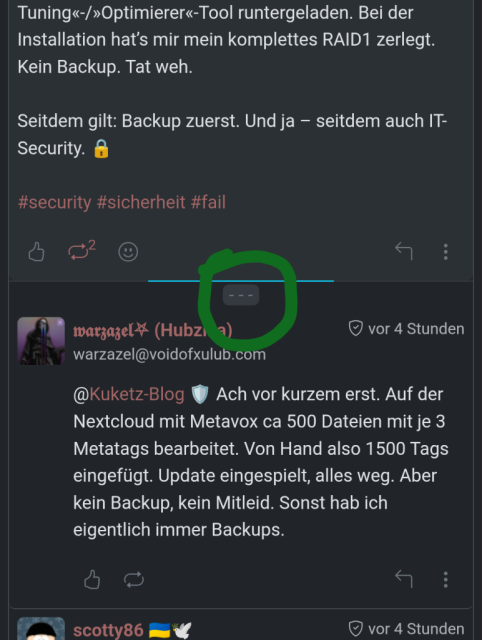
Translated with DeepL.com (free version)
Ah, just discovered something new on Hubzilla by chance 😁 With the small, inconspicuous button, you can scroll through the comments.
#Hubzilla
Wenn man in Hubzilla mit einem Bild auf einen Kommentar antworten möchte muss man diese Option vorher noch aktivieren. Ich habe die Einstellung selber erst gefunden, als ich im Hubzilla-Hilfeforum nachgefragt hatte, Danke nochmal ^^ Zu finden ist sie unter Einstellungen - Privacy-Einstellungen - Enable OCAP access Danach kann man dann wie gewohnt im Editor auf das Bild-Icon klicken und ein Bild aus den eigenen Hubzilla-Dateien auswählen.
Translated with DeepL.com (free version)

#Hubzilla
Translated with DeepL.com (free version)
If you want to reply to a comment with an image in Hubzilla, you have to activate this option first. I only found the setting myself when I asked about it in the Hubzilla help forum, thanks again ^^ You can find it under Settings - Privacy settings - Enable OCAP access After that, you can click on the image icon in the editor as usual and select an image from your own Hubzilla files.
#Hubzilla
I don't have any need or desire to use Facebook or Twitter. I don't need Nextcloud or MediaGoblin or Drupal or Diaspora or GNU-Social or Mastodon or Wordpress. I've got all of the features from those applications that I want - right now, without needing those applications.
I've got as much privacy as I want or need - up to top secret messages between top secret friends if I need that level of privacy. I can share photos from my photo albums and videos from my library with selected friends and only those selected friends.
I've got 16 years of my online life literally in my pocket. Everything I need to keep from my online life over those years. I can spin it up on any server in the world at any time and have all my friends and all my content intact if the datacenter serving my stuff gets hit by a nuclear warhead. I can spin it up right now and keep it all synced between servers as I add new content - and switch to another server at any time; for just a few minutes or a few years.
My server is my social network, even though I'm the only person with an account on it. My friends have their own servers and these all work together. It's my personal cloud and my file sharing app. If I allow you to see my videos you can see them. If I don't - you can't and there's nothing you can do about it. You don't need a password on my machine to do this. You just be yourself and do your own thing, and if you can see them you'll see them.
I don't see targeted ads. My dead friends don't recommend products for me to buy (this actually happened to me once on Facebook). I don't get spam from Twitter begging me to login and let them analyse me.
This is what we mean by "own your data"
I've got as much privacy as I want or need - up to top secret messages between top secret friends if I need that level of privacy. I can share photos from my photo albums and videos from my library with selected friends and only those selected friends.
I've got 16 years of my online life literally in my pocket. Everything I need to keep from my online life over those years. I can spin it up on any server in the world at any time and have all my friends and all my content intact if the datacenter serving my stuff gets hit by a nuclear warhead. I can spin it up right now and keep it all synced between servers as I add new content - and switch to another server at any time; for just a few minutes or a few years.
My server is my social network, even though I'm the only person with an account on it. My friends have their own servers and these all work together. It's my personal cloud and my file sharing app. If I allow you to see my videos you can see them. If I don't - you can't and there's nothing you can do about it. You don't need a password on my machine to do this. You just be yourself and do your own thing, and if you can see them you'll see them.
I don't see targeted ads. My dead friends don't recommend products for me to buy (this actually happened to me once on Facebook). I don't get spam from Twitter begging me to login and let them analyse me.
This is what we mean by "own your data"
Als ich mir grade nochmal die Spalte "term" in der Hubzilla-Datenbank angeschaut habe ist mir aufgefallen das der vorherige Code ziemliche Probleme beim zusammenzählen machen kann. Das Problem ist das die Einträge aller User die man auf seinem Hub, also alle aus jedem Stream, Activitypub, Zot, sieht dort gespeichert werden. Und wenn da nur einer denselben Kategorienamen verwendet wie ihr wird der mit gezählt. Dummerweise finde ich in der Spalte aber auch keine eindeutigen Werte wie eine absolute User-ID, mit der man die Kategorie abgleichen mittels AND abgleichen könnte.
Man könnte seiner Kategorie eine lange Nummer geben aber das sähe ja blöd aus.
Also fällt mir grade für die App Karten und Artikel nur folgender Code ein, hier wird einfach die komplette Hub-Domain mitsamt dem Usernamen als Kategoriename abgefragt, das ist eindeutig genug:
Den Teil wo die Suchvariable eingelesen wird, ändert man einfach wie folgt:
Für Karten:
$status = 'https://deine_hub_domain/cards/dein_nickname?cat=Deine_Kategorie';
Für Artikel:
$status = 'https://deine_hub_domain/articles/dein_nickname?cat=Deine_Kategorie';
Die steht aber auch im Browser-Adressfeld wenn man auf die jeweilige Kategorie klickt oder mit Rechtsklick kopiert
#Hubzilla #Datenbank #MySQL
Man könnte seiner Kategorie eine lange Nummer geben aber das sähe ja blöd aus.
Also fällt mir grade für die App Karten und Artikel nur folgender Code ein, hier wird einfach die komplette Hub-Domain mitsamt dem Usernamen als Kategoriename abgefragt, das ist eindeutig genug:
$host = 'localhost';
$dbname = '...';
$user = '...';
$password = '...';

try {
$pdo = new PDO(
"mysql:host=$host;dbname=$dbname;charset=utf8mb4",
$user,
$password,
[PDO::ATTR_ERRMODE => PDO::ERRMODE_EXCEPTION]
);
} catch (PDOException $e) {
die('Verbindung fehlgeschlagen: ' . $e->getMessage());
}

$sql = "SELECT COUNT(*) AS anzahl FROM term WHERE url = :status";
$stmt = $pdo->prepare($sql);

// ==== Hier den Eintrag anpassen ====
$status = 'https://voidofxulub.com/cards/warzazel?cat=Lese-Log';
$stmt->bindParam(':status', $status, PDO::PARAM_STR);
$stmt->execute();
$row = $stmt->fetch(PDO::FETCH_ASSOC);

// ==== Ergebnis ausgeben ====
echo "Es gibt {$row['anzahl']} Einträge";
Den Teil wo die Suchvariable eingelesen wird, ändert man einfach wie folgt:
Für Karten:
$status = 'https://deine_hub_domain/cards/dein_nickname?cat=Deine_Kategorie';
Für Artikel:
$status = 'https://deine_hub_domain/articles/dein_nickname?cat=Deine_Kategorie';
Die steht aber auch im Browser-Adressfeld wenn man auf die jeweilige Kategorie klickt oder mit Rechtsklick kopiert
#Hubzilla #Datenbank #MySQL
@Der Pepe (Hubzilla) ⁂
@𝓒𝓱𝓻𝓲𝓼
Hey es gibt ne Änderung 😅 Ganz schön durchheinander gewürfelt die Datenbank 🤷♂️
@𝓒𝓱𝓻𝓲𝓼
Hey es gibt ne Änderung 😅 Ganz schön durchheinander gewürfelt die Datenbank 🤷♂️